
Patient Portal
Take Control of Your Healthcare Journey: A Guide to the Patient Portal

Who Can Use the Patient Portal?
The eClinicalWorks Patient Portal is designed for patients receiving care from healthcare providers who use the eClinicalWorks electronic health record system. It can be used by patients of primary care providers, specialists, hospitals, clinics, and other participating healthcare organizations.
Why Use the Patient Portal?
The Patient Portal offers a convenient and secure way to stay connected with your healthcare and manage important health information. Here are some of the key benefits:
- Access your health information anytime: View available medical records, lab results, medications, immunizations, allergies, and other important health information when you need it.
- Manage appointments and prescription requests: Conveniently schedule appointments and request prescription refills online, helping you save time and reduce unnecessary phone calls.
- Communicate securely with your healthcare team: Send secure messages to your doctor or healthcare provider and get answers to questions about your care.
- Make payments online: Access convenient online options for managing and paying eligible medical bills securely.
- Help manage your family's healthcare: Depending on available access, you may be able to manage healthcare information for your children or other authorized family members.
- Stay informed about your health: Access helpful educational materials, resources, and information to support your healthcare journey.
What Can You Do with the Patient Portal?
The eClinicalWorks Patient Portal provides a range of convenient features and resources to help patients stay connected with their healthcare and manage important health information, including:
- Access to medical records: Review your medical history, including available lab results, medications, immunizations, allergies, and other important health information.
- Online appointment scheduling: Schedule and manage appointments conveniently through the portal.
- Prescription refill requests: Request prescription refills online without the need to call your healthcare provider's office.
- Secure messaging: Communicate securely with your doctor or other healthcare providers and receive important messages about your care.
- Online bill payment: Conveniently and securely manage and pay eligible medical bills online.
- Health information and resources: Access educational materials and helpful resources covering a variety of health and wellness topics.
- Family health management: Depending on authorized access, manage health information for your children or other family members through the portal.
How Do You Use the Patient Portal?
Getting started with the eClinicalWorks Patient Portal is simple. To access the portal, you will first need to create an account through your healthcare provider or by visiting the eClinicalWorks Patient Portal login page.
Once your account has been created, you can securely log in to access the available features and resources. From managing your health information and appointments to communicating with your healthcare provider, the portal provides convenient access to important aspects of your healthcare in one place.
Logging into the eClinicalWorks Patient Portal
The eClinicalWorks Patient Portal provides convenient access to important healthcare services, including viewing available medical records, requesting prescription refills, managing appointments, and securely communicating with your healthcare providers.
Here’s how to get started:
1. Visit the eClinicalWorks Patient Portal
Go to your healthcare provider’s designated eClinicalWorks Patient Portal login page. https://mycw200.ecwcloud.com/portal31614/jsp/100mp/login_otp.jsp
You can access the portal by clicking the link above or by visiting the login page through your healthcare provider’s website.
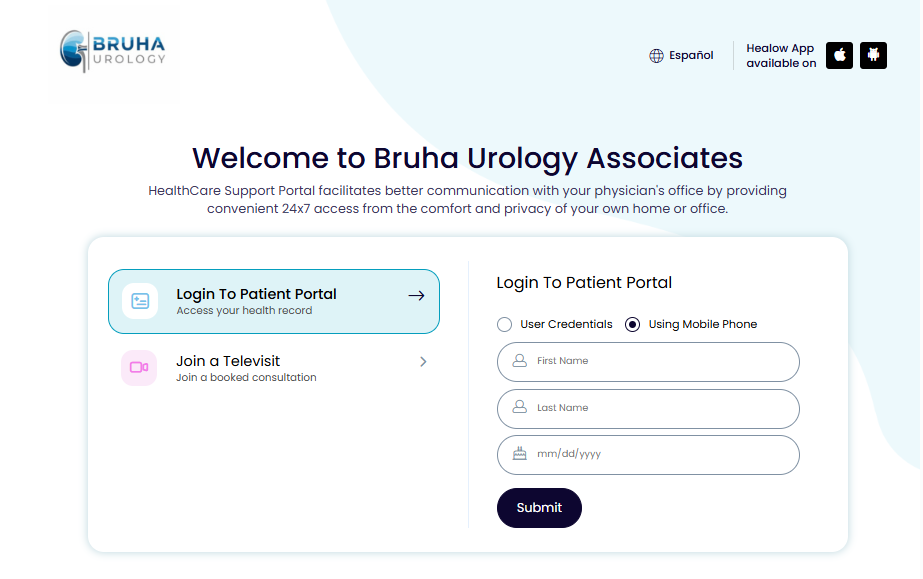
2. Enter your login credentials.
Enter your username and password in the appropriate login fields. If you have not yet created an account, select the “Create Account” option to begin the registration process.
3. Sign In to Your Account
After entering your login information, click the “Sign In” button to securely access your Patient Portal account and explore the available features and resources.
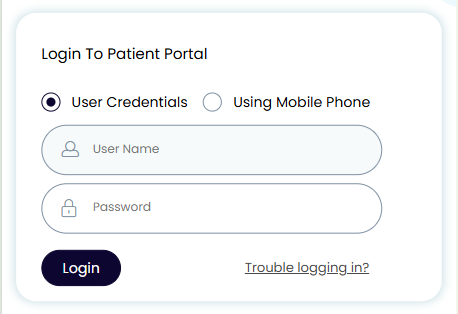
eClinicalWorks Patient Portal login page
4. Review the Security Information
The first time you log in, you may be asked to review important security information. Take a moment to read the information carefully, then click the “Accept” button to continue and access your account.
5. You’re Successfully Logged In to the eClinicalWorks Patient Portal
Once you’ve logged in successfully, you can conveniently access a range of healthcare features and resources, including:
- Medical records and health information
- Appointment scheduling
- Prescription refill requests
- Available lab results
- Billing statements
- Secure messaging with your healthcare providers
- Educational resources and health information
Additional Tips for Accessing the eClinicalWorks Patient Portal
For a smooth and secure login experience, keep the following tips in mind:
- Keep your web browser updated: Using the latest version of your browser can help ensure the portal works properly and securely.
- Use a strong, secure password: Choose a unique password and keep it private to help protect your account.
- Never share your login details: Keep your username and password confidential and do not share them with others.
- Reset your password if needed: If you forget your password, use the “Forgot Password?” option available on the login page.
- Contact your healthcare provider for assistance: If you experience difficulties accessing your account, contact your healthcare provider's office for help.
Answering the call to serve has been the purpose of my life’s work, and having the privilege to be your doctor is something I deeply value. Thank you for placing your trust in me and allowing me to be part of your healthcare journey.